How class rules work
Class rules answer one question: “This class has N competitors — which rounds does it dance?” The federation writes the rules once per discipline, and the Round Guide in Manager applies them to every competition, so organizers get the right rounds without building them by hand. Class rules are not the federation’s rule profiles (licences, progression, age composition and the like): those are set under Rulebook, while class rules live per discipline under Structure.
This page starts with the thinking behind class rules and walks through one example. It then shows the screens you work in: the rules list, the rule editor, the checks that find rules that probably are not meant (findings), the By class tab that explains what a class gets, merging copies of the same rule, and the default ladder. It ends with a reference of every condition, action and setting. For complete rule sets you can copy, see Battle class rules and Battle sub-rounds.
Only federation administrators can change class rules. Other federation staff can read the list, the findings and By class.
Draft. This page collects what the other federation guides already use. Settings that no guide covers yet are not listed.
The thinking behind class rules
The problem they solve
Nobody knows how many competitors a class will have until registration closes. Twelve entries need a different competition from four — more rounds, other cuts, perhaps a B-final. Without rules, every organizer would build those rounds by hand at every event, and two competitions under the same federation could run the same class differently.
Class rules move that decision to where it belongs: the federation’s rulebook. The federation describes once how a class is danced, and every competition gets the same answer for the same number of competitors.
Describe the pattern, not every case
A rulebook does not say “with 10 dancers do this, with 11 do that, with 12 do something else”. It describes a pattern:
The field is cut down round by round until two remain for the final. The first round is a placing round judged 10-0. Semifinal losers dance a B-final for third place.
Class rules are written the same way, in three layers of thought:
| Ask yourself | Goes into | Example |
|---|---|---|
| How does the field shrink? | The ladder — the Round sizes of the base rule | 16 → 8 → 4 → 2 |
| What is special about each stage? | Rules that say when by the round’s place | The placing round is judged 10-0; the semifinal has a B-final |
| Which sizes break the pattern? | Rules limited to a number of competitors | With exactly 6, the semifinal is danced in trios |
Work down the table and stop as early as you can. Most of a rulebook is captured by the ladder and a handful of stage rules; rules for particular numbers of competitors are for the genuine exceptions. The same thinking is behind brackets mode for battles, which replaced 13–17 per-count rules with four.
If you find yourself writing one rule per number of competitors, step back and look for the pattern you are repeating.
Anchor stages to the final, not the start
What stays the same when a class grows? Not its beginning — a big class gets extra rounds at the front. Its end stays the same: there is always a final, and before it a semifinal. That is why the rule editor offers The final and The semi-final, quarter-final or another round counted from the final: “the semifinal” means “2nd from the end” whether the class has three rounds or five. Counting from the start only makes sense for the one round that is always first.
General first, exceptions narrower
The same idea runs through the whole federation structure. A rule set on the discipline covers every class in it; a category, age group, class level or single federation class only overrides what is truly different for it. You state the common case once and keep exceptions small and visible — and the Rulebook shows, for any class, which value won and where it came from.
The four steps in practice
Every time the Round Guide builds a class, the same four steps run:
  1. Count        How many competitors are in the class?          → 10
  2. Ladder       Pick the round sizes from Round sizes.          → 16, 8, 4, 2
  3. Rounds       One round per size, largest first.              → 4 rounds, ending in the final
  4. Rules        Each rule looks for rounds it matches           → names, judging,
                  and changes, adds or removes them.                 an extra B-final …
Steps 1–3 give a plain list of rounds. Step 4 is where your rules shape them. A rule is always the same three things:
- Applies to — which classes it is for: a category, class level and age group, or any.
- When — which rounds, and for which class sizes: for example “the semifinal”, or “only when the class has 6 competitors”.
- Change — what it writes: a round name, a judging type, a floor size, an extra round beside the matching one, or a round removed.
One rule has no conditions at all: the base rule. It holds the defaults for the whole class, above all the Round sizes ladder. Start every rule set there.
Worked example: 10 competitors
The discipline has three rules:
| # | When | Change |
|---|---|---|
| 1 | Every round (the base rule) | Round sizes 2, 4, 8, 16, 200; Round name(s) Final, Semi-Final, Quarter-Final, Placing round |
| 2 | The first round | Judging type 10-0 |
| 3 | The semi-final, quarter-final or another round counted from the final → Semi-final (2nd from the end); under Advanced, Action is Add After | Round name(s) B-final; Num to advance 0 (Count); Round position 3 |
Step 1 — the count is 10.
Step 2 — the ladder. The generator takes the first size in Round sizes that is at least as large as the count. For 10 competitors that is 16, and the ladder runs down from there: 16, 8, 4, 2.
A size is the round’s capacity, not how many dance in it — all 10 competitors dance the 16-size round. Read the ladder as “how big a field each round can take”: 10 is too many for a quarterfinal of 8, so the class needs a round before it. (When no size is large enough, the largest size is used.)
Step 3 — the rounds, and how they are numbered. Each round can be counted from either end:
| Round | Size | From start | From the final | Name (from Round name(s)) |
|---|---|---|---|---|
| Placing round | 16 | 1 | 4th | Placing round |
| Quarterfinal | 8 | 2 | 3rd | Quarterfinal |
| Semifinal | 4 | 3 | 2nd | Semifinal |
| Final | 2 | 4 | 1st | Final |
The name list is read from the final outward: the first name is the final, the second the semifinal, and so on.
Step 4 — the rules.
- Rule 2 matches the first round → the placing round is judged 10-0.
- Rule 3 matches the semifinal → a B-final is added beside it. Nobody advances from it (Num to advance 0) and it awards places 3–4 (Round position 3).
Result: Placing round (10-0) → Quarterfinal → Semifinal + B-final → Final.
Same rules, 6 competitors
Now the first size at least as large as 6 is 8, so the ladder is 8, 4, 2 — only three rounds:
| Round | Size | From start | From the final |
|---|---|---|---|
| Placing round | 8 | 1 | 3rd |
| Semifinal | 4 | 2 | 2nd |
| Final | 2 | 3 | 1st |
Rule 3 still finds the semifinal, because the semifinal is always 2nd from the end. Had rule 3 been set to “the third round from the start”, it would have hit the semifinal at 10 competitors but the final at 6.
This is the most important habit in class rules: name stages from the final. The final is always the last round and the semifinal the one before, however many rounds a class gets. Use The first round for the one round that is always first.
One trap remains: at 6 competitors, the 3rd from the end is the placing round, not a quarterfinal. A rule for the quarterfinal that you meant only for big classes would land on the placing round of a small one. The Rounds this hits strip in the rule editor shows this before you save (The rule editor); limit the rule with And only when the class has between … competitors if it reaches a round you did not mean.
Building a rule set, step by step
The steps follow the three questions above: the ladder first, then the stages, then the exceptions.
- Write the base rule. Press Add class rule in the Class rules tab. Leave When on Every round, and under Change set Round sizes and Round name(s). For a 1v1 battle discipline, set Round type to Brackets instead and let the generator build the bracket (Battle class rules).
- Check it. Open the By class tab (Check a class), pick a class, and try a few numbers of competitors — a small one, a typical one and a large one — to see the round list before adding anything else.
- Add stage rules. Judging, music and names that belong to “the first round”, “the final” or “the semifinal” go on a rule whose When says that stage, not on a number of competitors.
- Add extra rounds. A B-final or a bronze battle is a rule with Action Add After, on the round it sits beside. A presentation or warm-up danced before everything else is a rule for Before the first round (A round before the first round).
- Only then handle special numbers of competitors. If one size genuinely needs a different shape (six competitors dancing trios, for example), add a rule limited with And only when the class has between … competitors.
- Check again at every size you touched, open the Findings tab, and look at the merged result in Federation → Rulebook.
The rules list
Class rules live per discipline under Federation → Structure → (division) → Discipline, in the Class rules tab. The tab has three parts: Rules, the list; Findings, a check of the list (Findings); and By class, which explains what one class gets (Check a class). Preview a class at the top of the page opens By class, and Add class rule opens the rule editor with an empty rule.
Grouped and flat
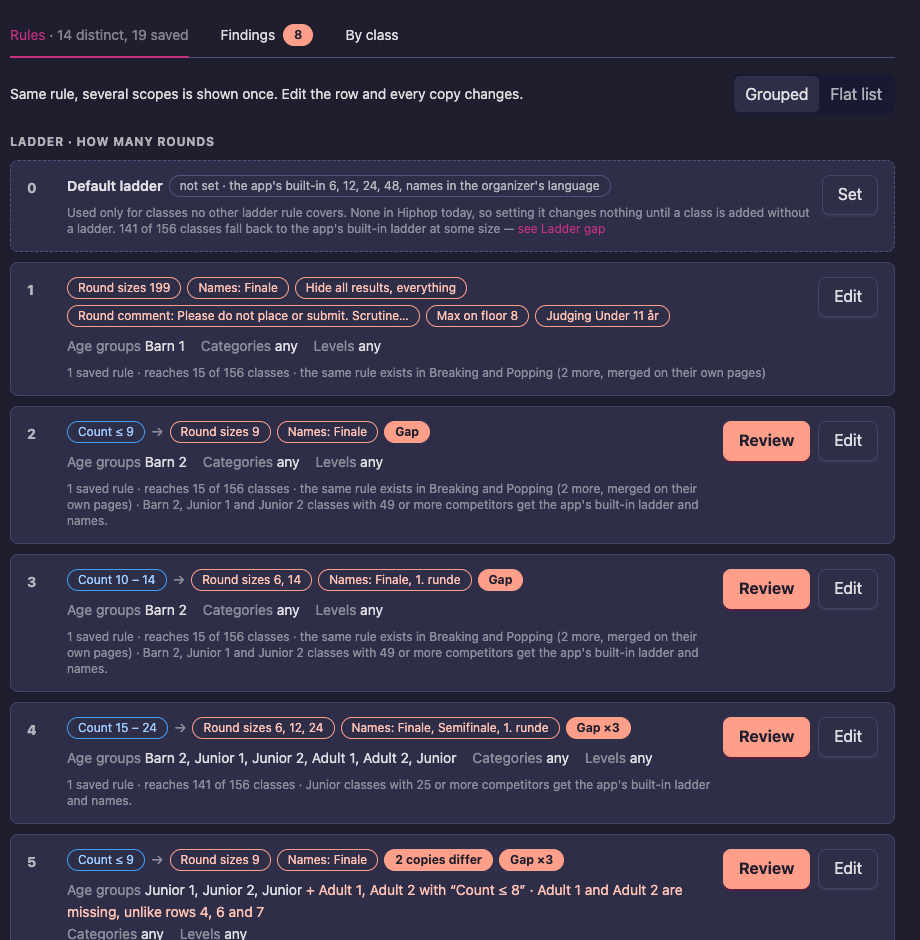
Over the years a discipline’s class rules collect copies: the same rule written once per class level or age group, because a rule could only name one of each. The list folds them into groups. A group is every rule that does exactly the same thing — the same conditions, the same changes, the same action and setup tag — and differs only in where it applies.
Switch between the two views with the buttons above the list:
- Grouped (the default) shows one row per group: “Same rule, several scopes is shown once. Edit the row and every copy changes.”
- Flat list shows every rule as it is stored, in the order the Round Guide reads them. Use it to see a single copy.
The choice is remembered in your browser. The tab itself says how many rows the list has: 14 distinct, 19 saved means 14 rows for 19 switched-on rules.
Rows are numbered in the order the Round Guide reads them, and the list is divided into four sections by what the rule changes: Ladder · how many rounds (round sizes and round names), Floor and music, Hidden results and Other. Order decides which rule wins when two rules set the same value. Drag a row to move it; the copies of a group always move together. A group that a round setup has replaced is locked and cannot be moved.
Each group row shows:
- What the rule does — small labels for its conditions (Count ≤ 9, Final, Every round except the final) and for what it changes (Round sizes 6, 14, Names: Finale, Max on floor 8, Judging …).
- Where it applies, one line per axis: the Age groups, Levels and Categories the copies name, or any when a copy leaves the axis open.
- How many copies, and how far they reach, such as 1 saved rule · reaches 15 of 156 classes. “Reaches” counts the discipline’s active classes that at least one copy applies to. A rule that reaches 0 classes does nothing today. A note such as 1 switched off counts copies you have turned off, and the same rule exists in Breaking and Popping tells you the other disciplines of the division have a copy of their own.
- A finding label, when the checks on the Findings tab found something about the group: Gap, 2 copies differ, Does the opposite, Unreachable, Never effective and so on (Findings). Review opens it.
- Edit all (on a group of copies, Edit on a single rule), Merge 5 (Merging copies) and, on a group a finding blocks, Review before merging.
Edit all opens the rule once and saves your change on every copy. Press Apply to all 3 copies: the conditions, changes, setup tag, action and status are saved on each copy, while every copy keeps its own category, level and age group. That is the way to fix one thing in 40 identical rules.
A group that reaches no class, or that is entirely switched off, has a button to Hide from the list. Hiding is only in your browser: nothing is written to the rule, and it still applies if a class that fits it is created later. Show 1 hidden rule brings hidden rows back, and Show in the list again undoes it.
Under the last row, Merge all safe groups merges every group of identical copies that passes the check in one go (Merge all safe groups).
Row 0: the default ladder
The first row, numbered 0, is the Default ladder: the ladder a class gets when no other rule gives it one. When the discipline has none, it says not set and what the app uses instead, such as the app’s built-in 6, 12, 24, 48 round sizes with round names in the organizer’s language, and how many classes have no ladder rule today. Press Set (or Edit) to open it (Default ladder).
The rule editor
Add class rule, and Edit or Edit all on a row, open the rule editor. It is a page of its own, with Class rules in the breadcrumb to go back. The title says what the rule does in words, such as “Max 4 on the floor in the quarter-final”. Save stores the rule, Disable (or Enable) switches it off without deleting it, and More has Copy, Paste and Delete.
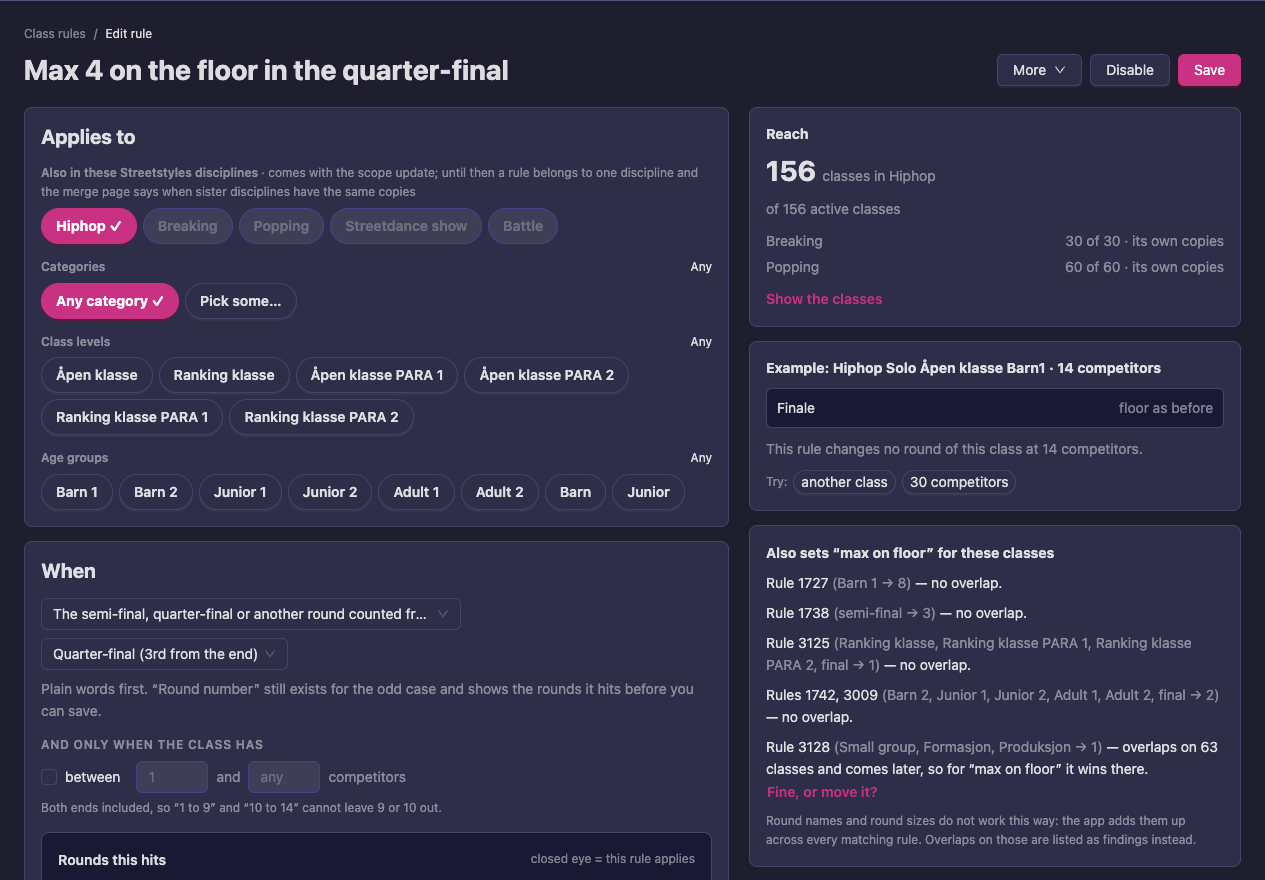
The editor has three cards on the left and three on the right.
Applies to. Pick the categories, class levels and age groups the rule is for. Any category and Any mean every value, including ones added later; Pick some… lets you choose. The Also in these … disciplines chips show which disciplines of the division there are, but they cannot be picked yet: a rule belongs to one discipline for now, and rules shared across disciplines are not possible yet. When you edit a group, each copy keeps its own scope and saving changes the conditions and the changes on all of them.
When. Which rounds, and for which class sizes, in plain words (Round conditions in plain words). Under Rounds this hits, a strip shows the rounds of an example class at a number of competitors you can change; a closed eye marks a round the rule applies to.
Change. What the rule writes. Each change is picked from a list grouped as Round setting, Bracket setting, Music and time and Other, such as Round sizes, Round name(s), Judging type, Num to advance, Hide from position, Max on floor, Music length or Dances (Settings). Another change adds one more. Under Advanced, Setup tags a rule as part of a variant that organizers can switch on, and Action says what the rule does with the round: Modify (the default), Add After or Remove. When Which rounds is Before the first round, Add After reads Add before the first round.
On the right:
- Reach counts how many of the discipline’s active classes the rule applies to, with Show the classes, and how many in the sister disciplines have their own copies.
- Example shows one class at one number of competitors and what this rule does to it, or says that the rule changes no round of it. Use another class and 30 competitors to try others.
- Also sets “…” for these classes lists the other rules that write the same setting on some of the same classes, with how many classes they share and which rule wins: the one that comes later in the list wins. Fine, or move it? offers Move this rule after it or Keep it as it is. Round names and round sizes do not work this way — the app adds them up across every matching rule — and overlaps on those are reported as findings instead.
Round conditions in plain words
The When card is set in words. For rounds, Which rounds offers:
- Every round
- The final
- Every round except the final (the usual choice for hiding results)
- The first round
- Before the first round, a round of its own danced ahead of all the others, such as a presentation or a warm-up (A round before the first round)
- The semi-final, quarter-final or another round counted from the final, with Semi-final (2nd from the end), Quarter-final (3rd from the end) and so on
- A range of rounds, From round … to round …, counted from the start or from the final (rarely needed)
Under And only when the class has, tick between … and … competitors to limit the rule to a class size. Both ends are included, so “1 to 9” and “10 to 14” cannot leave 9 or 10 out.
A rule that sets round sizes, round names or brackets is read before any round exists, so a round choice can never apply to it. For those rules only Every round and a number of competitors are offered.
Rules saved the old way. Rules saved before the plain-word editor compared the number first and the round second, so a condition such as “round at least 3” in them means “round 3 or earlier”, not “round 3 or later”. Nothing was changed in them. The list still shows the condition as it was written (Round ≥ 3 from end); the editor and the Does the opposite finding say what it behaves as, such as “round 3 from the end and earlier”, and the finding lets you choose what you want to keep (Rules that read backwards). Saving a rule in the editor writes it in plain words from then on.
A round before the first round
Some classes dance a round before the competition starts that is not judged, such as a presentation where every couple is shown, or a warm-up. A class rule adds it to the classes it is for, so organizers get it from the Round Guide without adding it by hand.
- Press Add class rule and, under Applies to, pick the classes the round is for, such as the levels that dance a presentation.
- Under When, set Which rounds to Before the first round. The rule now adds a round: under Advanced, Action says Add before the first round.
- If only some class sizes dance it, tick between … and … competitors, for example 2 and 6 for classes that dance a final only.
- Under Change, set up the added round, for example Judging type with no judging, Round name(s) “Presentation”, Num to advance 100 %, Max on floor, Music length and Extra time.
- Check Rounds this hits and Example on the right: they show the added round first, at a number of competitors the rule is for. Then press Save.
The added round is danced by all competitors and the class’s own rounds follow it unchanged. A rule with Which rounds set to Before the first round and Action Modify changes the round another rule adds there.
Findings
The Findings tab reads the discipline’s rules and reports what probably is not meant: copies that drifted apart, holes in the ladder, rules no class reaches. It does not change anything by itself. The number on the tab is how many findings there are. A federation for which findings are not available yet says so on the tab.
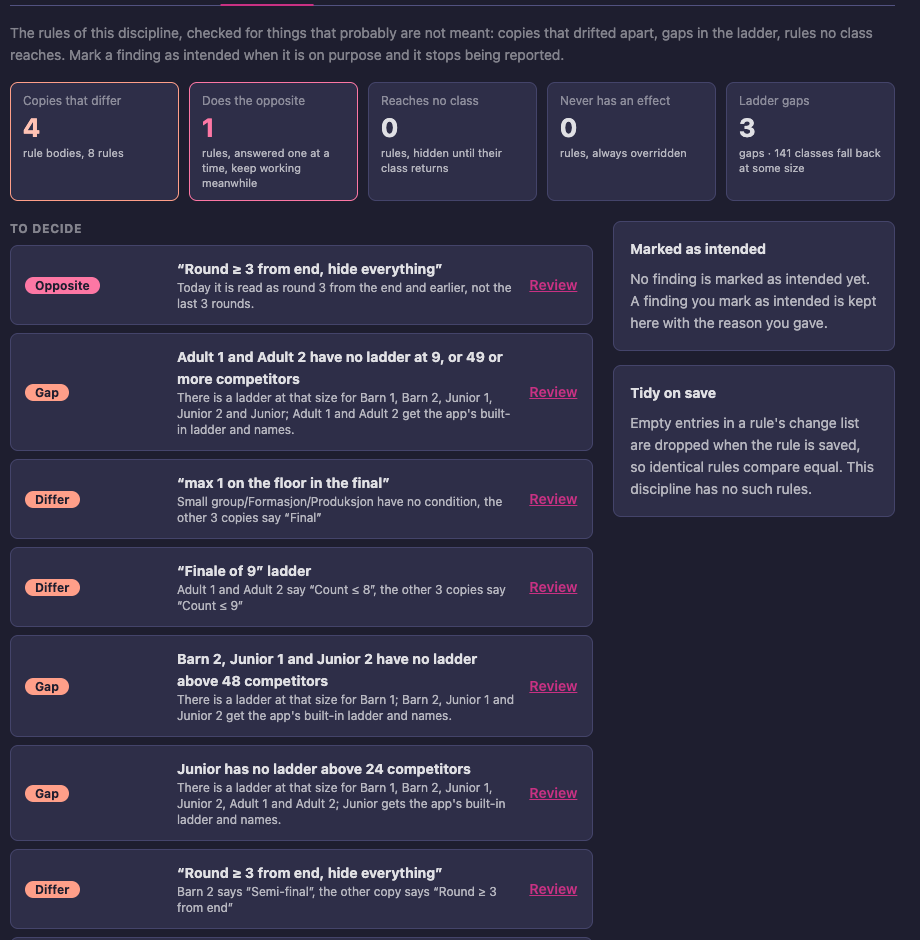
At the top are tiles that count the findings by kind. Press a tile to show only that kind (Showing only: …), and Show all to come back:
| Tile | In plain words |
|---|---|
| Copies that differ | Copies of the same rule that are valid under different conditions. Usually one copy drifted. |
| Does the opposite | A round condition that does the opposite of what it says (Rules that read backwards). Answered one at a time; the rules keep working meanwhile. |
| Reaches no class | No active class has the category, level and age group the rule is about. It applies again as soon as such a class exists. |
| Never has an effect | The rule matches classes but never changes anything: a later rule overrules it, or its conditions never hold. |
| Ladder gaps | For some numbers of competitors no rule gives a class its round sizes, so the default ladder, or the app’s built-in one, is used. The tile says how many classes fall back at some size. |
Three more kinds show up in the list without a tile: Round condition on a ladder (a rule that sets round sizes, names or brackets also waits for a particular round, which can never hold), Overlapping ladders (two rules give the same class a ladder at the same numbers of competitors, so their sizes are merged and their names added after each other) and Same as the default ladder or Could be one class rule (a rule that repeats the default ladder, or copies that together name every value of an axis).
Two kinds point at rules that cannot work at all, and are also listed without a tile:
| Label on the card | In plain words |
|---|---|
| Deleted value (Deleted category, level or age group) | The rule is for a category, level or age group the division no longer has. No class can be made for it, so it applies to no class, now or later. |
| Unreadable (Cannot be read) | The rule’s settings are not valid: its conditions or changes cannot be read. When rounds are made the rule is skipped, so it does nothing at any competition. |
Under To decide, the findings are listed as cards, most important first, sorted by how many classes each one touches. Each card names the rules and says in a line what is wrong; Review opens it. Hide the N unreachable rules hides all the unreachable rules at once; it only hides them in your browser, like Hide from the list above.
On the right, Marked as intended keeps the findings you have answered with “this is on purpose”, with the reason you gave, who gave it and when; Show them lists them and Unmark makes a finding count again. Tidy on save says how many rules have empty entries in their list of changes; they are cleaned up whenever a rule is saved, so that identical rules compare equal.
Reviewing a finding
Press Review on a card or on a group in the list. The review opens beside the list. Use the arrows next to Findings · 4 of 8 to step to the previous or next finding, and the Other findings in … links at the bottom to jump to one. Every review ends the same way: Apply your answer, Ask a colleague (it copies a link that opens this finding), or Later.
Copies differ. You see the copies in a table, the conditions they have and the rounds each gives at the number of competitors where they differ, with the odd ones highlighted. Why we think it is a slip says what points to a mistake, and Who it touched says how many classes danced at exactly that size in the last 12 months, with a link to See the rounds a class gets today. Then you answer What was intended?:
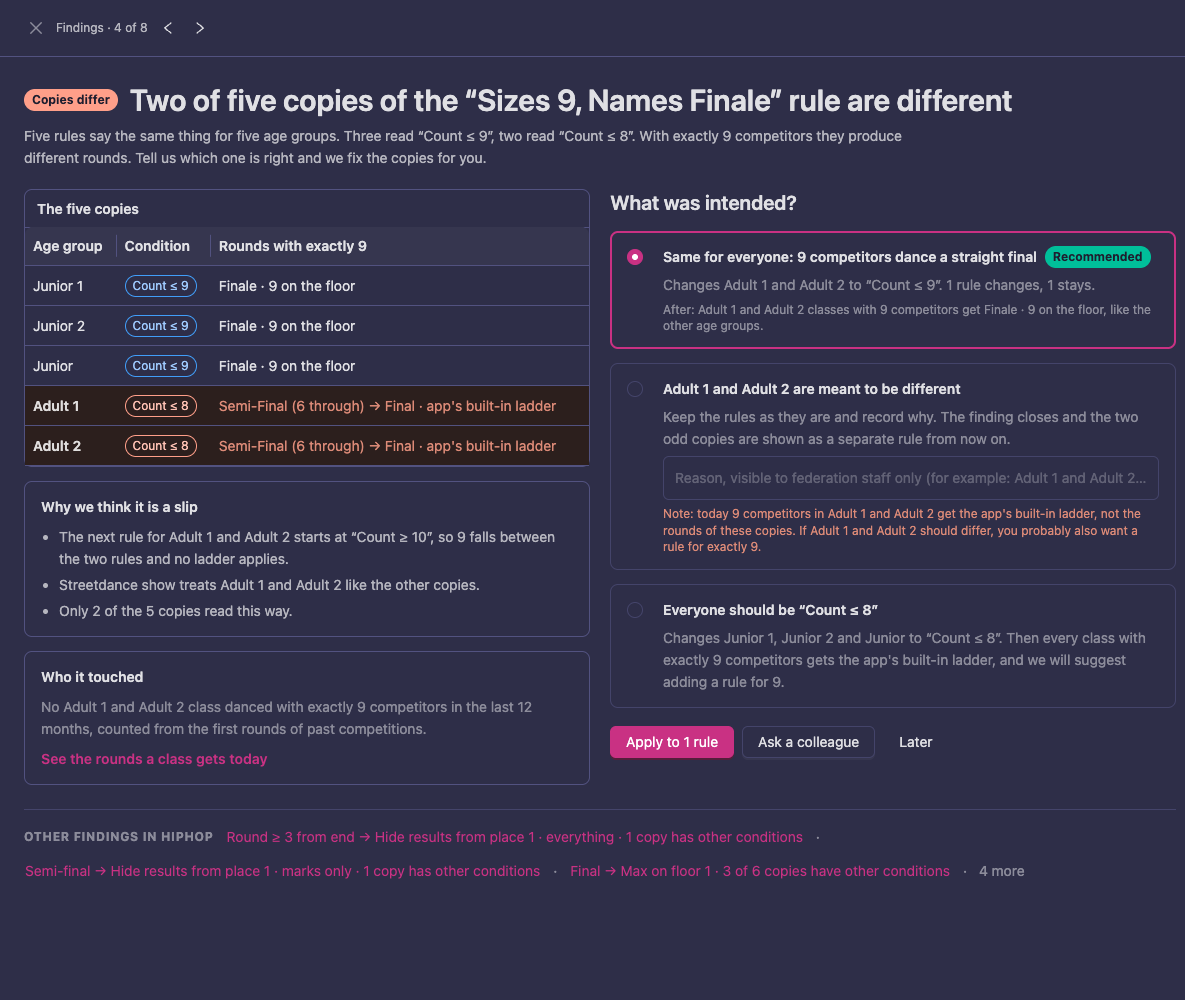
- Same for everyone (marked Recommended when most copies agree): the odd copies get the conditions most copies have. It says how many rules change.
- … are meant to be different: nothing changes, the finding closes and the odd copies are shown as a separate rule from now on. Write why in the box under it; the reason is visible to federation staff, and you can come back to it under Marked as intended. A warning tells you if the size where they differ then falls between two rules, so you probably want a rule for it.
- Everyone should be … (the other reading): the majority is changed to match the odd copies, and a rule for the missing size is suggested.
Press Apply to 1 rule (the button says how many).
Ladder gap. The review lists the rules that have a ladder at that size and the ones that do not, and what the classes get now. There is nothing to click to fix it: add a ladder rule for the missing sizes with Add class rule, or answer Mark as intended with a reason, for example that these classes never get that many competitors.
Other findings. Reaches no class and Same as the default ladder offer Hide these rules (in your browser only); Round condition on a ladder offers Remove the condition, which changes nothing because the condition never applied; Could be one class rule offers Make it “any”, which opens the merge with every value of that axis selected. Mark as intended, with an optional reason, is there for every kind except Cannot be read.
Deleted value and Cannot be read. Both reviews offer Switch off. A switched-off rule stays saved, with everything it says, but no longer applies; you can switch it on again later. To deal with one:
- Press Review on the card. The review names the rules and, for a deleted value, which category, level or age group is gone.
- Press Switch off, and confirm with Switch off in the question that follows (“Switch off this rule? It stays saved and can be switched on again.”). Switched off confirms it, and the finding leaves the list.
- If the rule is still needed, make it again with Add class rule: for a deleted value, pick a category, level or age group that exists; for a rule that cannot be read, set its conditions and changes again in the editor.
For a deleted value you can also answer Mark as intended instead, for example while the value is about to be added back. A rule that cannot be read can only be switched off. To switch a rule on again, open it in the rule editor and press Enable (The rule editor).
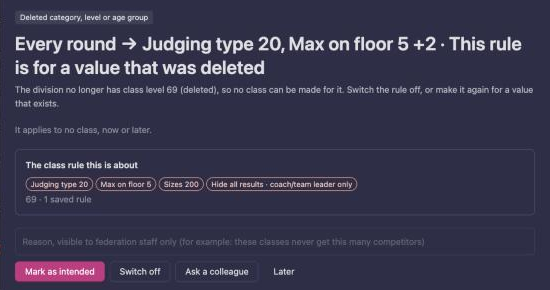
New and changed rules are checked when they are saved, so a rule whose settings cannot be read is refused with “The rule’s conditions or changes are not valid, so it was not saved.” These findings only turn up for rules saved before that check.
Rules that read backwards
A rule written as “round at least 3” has always behaved as “round 3 or earlier”, so competitions ran that way. The question is not what the words say but what you want to keep, and the review shows it: What happens today and What the rule says, as the rounds of one example class with the hidden rounds shown as closed eyes. Under Which one do you want? there are three answers:
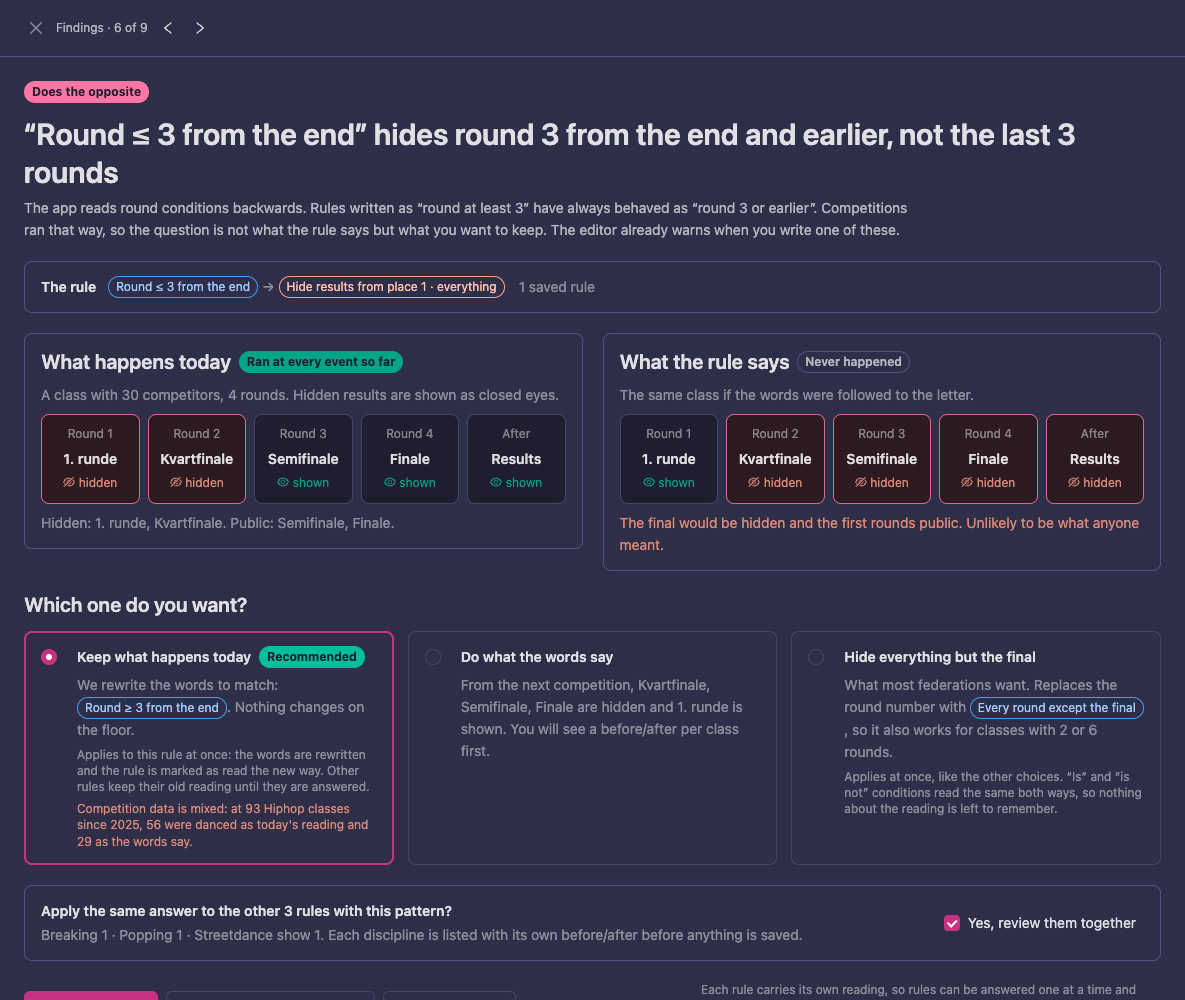
- Keep what happens today (preselected, Recommended): the words are rewritten to say what the rule does, so nothing changes on the floor. Below it the review says what the past competitions show, such as how many classes since last year were danced as today’s reading and how many as the words say.
- Do what the words say: from the next competition the rule is read as written. Classes get different rounds than today, and you see a before and after per class first (Show before/after per class).
- Hide everything but the final (for a rule that hides results; for other rules it reads “… on every round except the final”): the round condition is replaced with Every round except the final, which also works for classes with 2 or 6 rounds.
The same pattern often exists in the division’s other disciplines. Apply the same answer to the other 3 rules with this pattern? with Yes, review them together answers them in one go, each discipline listed with its own before and after before anything is saved. Each rule carries its own reading, so rules can be answered one at a time and the ones you have not answered keep working as they do now.
Across the federation
Federation → Structure → Class rule findings checks the class rules of every discipline in turn. This is not the Rulebook: the federation’s rule profiles live there, and this page only reads class rules. Open it from the Class rule findings card on a division’s Structure page, or from the Structure menu. It reads all the federation’s class rules, so it runs when you press Check all disciplines; Check again runs it again after you have made changes. The results are kept until the next run, and the line under the heading says when it last ran and how many disciplines and active classes it covered.
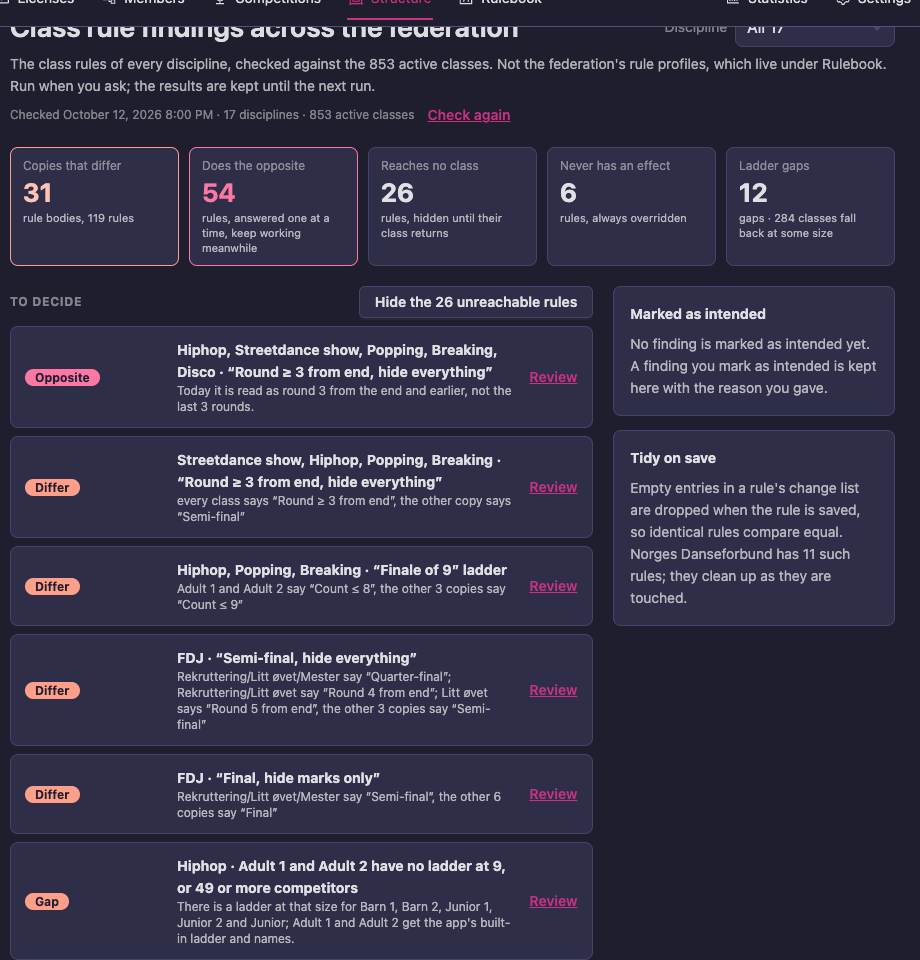
The page has the same tiles, To decide cards and Marked as intended as a discipline’s tab, with the disciplines named on each card, and Review opens the same review. Discipline at the top narrows the list to one discipline. Further down, Count across the federation counts the groups of identical copies that can be merged without changing anything, discipline by discipline; federation administrators then get Merge all … safe groups for the whole federation (Merge all safe groups).
Check a class
The By class tab answers “why did this class get these rounds?” — it is the page to open when an organizer says “the rounds look wrong”. It works for one class at one number of competitors.
- Open the Class rules tab and then By class (or press Preview a class).
- Pick the class under Class.
- Set Competitors: press 8, 9, 10, 24 or 30, or type a number.
- If the discipline uses setup tags, pick the Options to try.
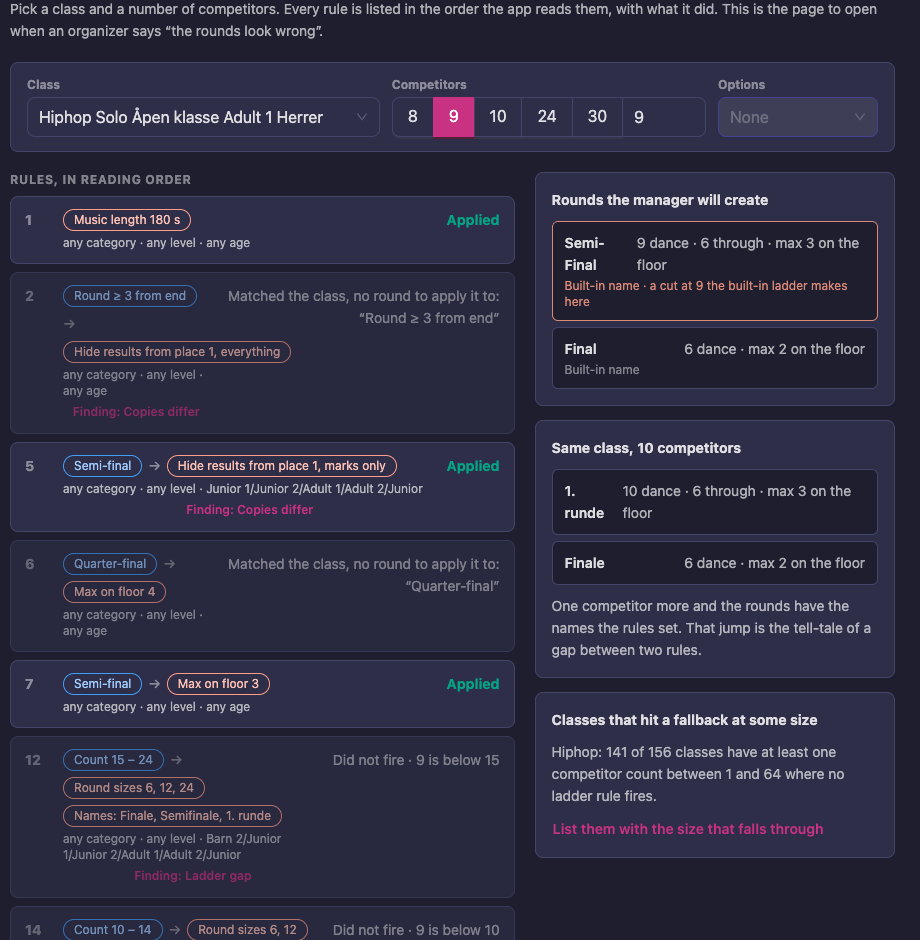
On the left, Rules, in reading order lists every rule the Round Guide reads, with what it did:
- Applied — the rules that fired. A rule that fired but whose changes were all overruled by later rules says Overruled by later rules, nothing it wrote remains.
- Matched the class, no round to apply it to and Did not fire — rules that are about this class, but whose conditions did not hold at this size or for these rounds, with the reason, such as “9 is below 15”. Often the answer to “why did my rule not apply?”.
- Did not match — rules that are about other classes; open the list to check that the rule you expected is not among the wrong ones.
- Fallback — shown when no rule set the round sizes or the round names. The row says what was used instead: the default ladder, or the app’s built-in ladder and names, in the language of whoever creates the rounds.
- A Finding label on a row that a finding is about, which opens its review.
On the right, Rounds the manager will create shows the rounds the Round Guide would make, with how many dance, how many go through and the floor size. A round that got a built-in name or a cut that no other age group dances is marked, which is how a hole in the ladder shows up. Same class with one more competitor shows the rounds one competitor higher, so you can see which rules start or stop applying — a rule that works at 9 and not at 10 is easy to miss otherwise. Classes that hit a fallback at some size counts the classes that fall back at some size between 1 and 64 competitors, and List them with the size that falls through shows them.
The check only simulates; it creates nothing.
Merging copies
When a group has two or more copies that are switched on, Merge 5 replaces them with one rule that applies to all their classes. The Round Guide keeps giving every class exactly the rounds it gave before. A merge cannot be undone: the copies are removed. What makes it safe is the check Vote4Dance runs first, and it merges nothing if the check finds a difference.
- Press Merge 5 on the group row. The dialog Merge 5 rules into one opens.
- Today shows the copies, After the one rule: the levels, age groups and categories it will name. Press Choose copies to leave a copy out. Press Make it any for an axis when the rule should apply to every value of it, including ones added later.
- Wait for the check. Vote4Dance runs the Round Guide on every active and draft class the merge could touch, for 1 to 200 competitors, with the old rules and with the merged rule, using the options of each class, and finds the place in the reading order where the merged rule gives the same rounds. When it passes, the dialog says Checked: the merged rule produces the same rounds, how many classes it checked and 0 differences.
- Press Merge 5 rules into 1 and confirm.
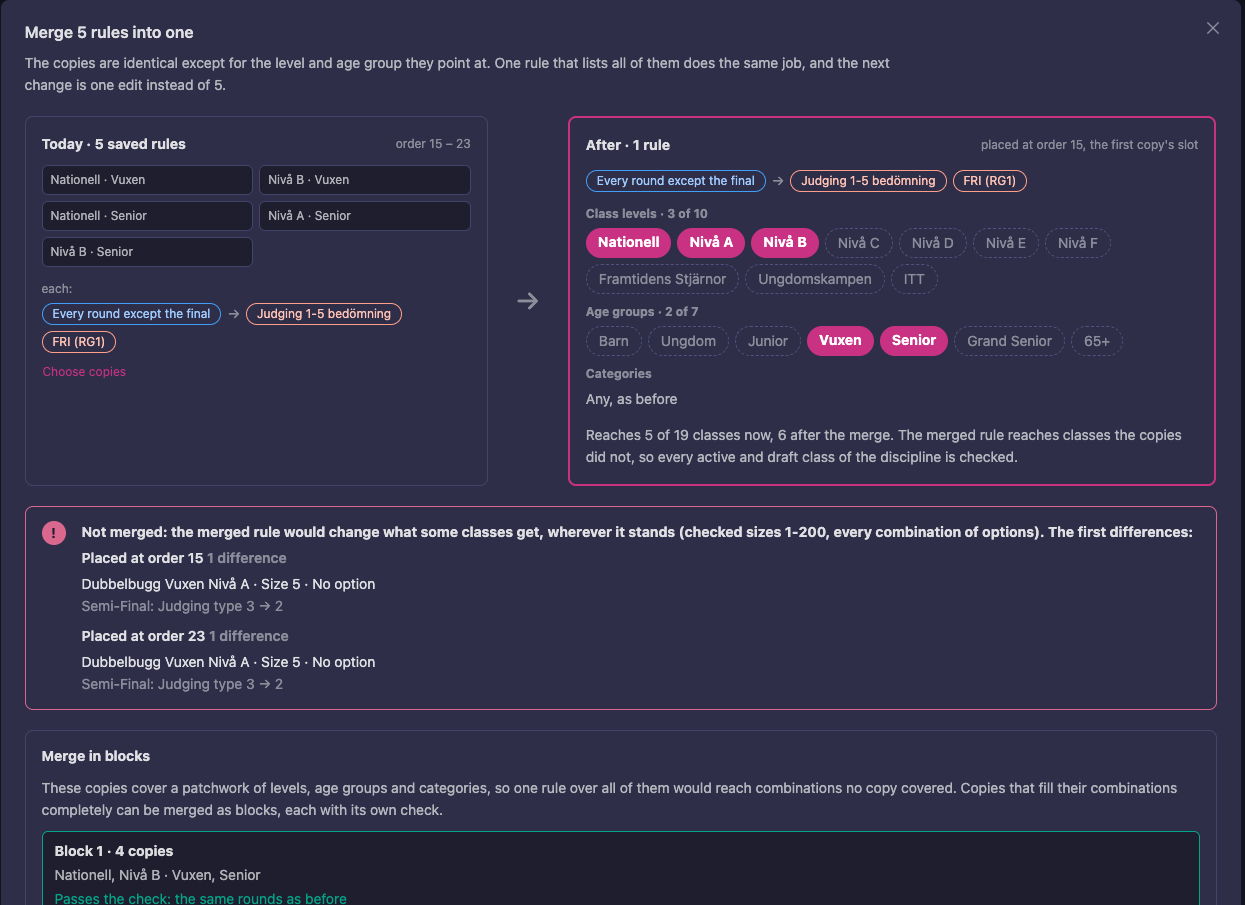
If the merged rule would change what some class gets, wherever it stands, the dialog says Not merged and shows the first differences: the class, the size and which round changes.
Merge in blocks. Some groups cover a patchwork of levels, age groups and categories, so one rule over all of them would reach combinations no copy covered and fail the check. The dialog then offers Merge in blocks: copies that fill their combinations completely are merged as blocks, each with its own check and marked Passes the check: the same rounds as before. Press Merge in 2 blocks. Copies that are in no block stay as they are.
What to know:
- The copies are removed and this cannot be undone. To split the rule again, open it, press More → Copy, press Add class rule, press More → Paste, then narrow its category, class level or age group.
- Identical copies can be merged while “Copies differ” is open for a group: the odd copies stay separate and are not touched.
- A copy that applies to every value of an axis cannot be merged with copies that name some values: it would widen them. The dialog leaves it out and says so, for example Left out: applies to every value of Age group, the others pick some.
- A merged rule can reach classes the copies did not (for example when it names every age group). Then every class of the discipline is checked, not only the ones the copies reached.
- Copies with a round condition that reads backwards cannot be merged yet. The button says Review before merging and opens that finding (Rules that read backwards).
- A copy that lists values to leave out cannot be merged, and neither can copies that read their round conditions differently.
- If the rules changed after you opened the page, the merge stops and asks you to reload.
- Each discipline is merged on its own page, with its own check. When sister disciplines have copies of the same rule, the dialog says so and links to them.
Merge all safe groups
Merge all safe groups under the list does the same for every group at once.
- Press Merge all safe groups (2) under the last row. Vote4Dance checks every group of identical copies in the discipline and sorts them.
- Read the two lists: Will merge (2), with each group and how many copies become one rule (and which block), and Will not merge (1), each with the reason: a finding has to be answered first, a copy lists values to leave out, a copy is replaced by a ladder, the copies read their round conditions differently, every value a copy lists is gone from the division, no class uses the copies, the check found that the merge would change a round, or a copy changed since the check.
- Press Merge 2 groups. The groups are merged one after the other, and each is checked again right before it is merged, against the rules as they are by then; a group that no longer passes is skipped.
- The result says how many groups were merged and how many rules fewer there are, and lists what was skipped or refused.
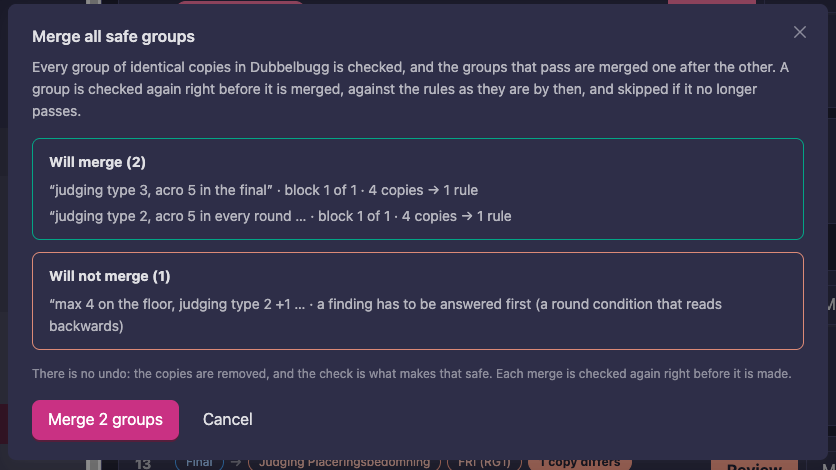
There is no undo here either: the copies are removed, and the check is what makes that safe. On the federation page, the same button for administrators handles the disciplines one after the other and gives a result per discipline.
Default ladder
The default ladder is the ladder a discipline’s classes get when no other rule gives them one: how many rounds, how big each is and what they are called. Without it, the app’s built-in ladder is used, with round names in the language of whoever creates the rounds. It is row 0 of the list, Rule 0 · pinned first, and has the lowest priority: any other rule that sets round sizes or names wins.
- In the Class rules tab, press Set (or Edit) on the Default ladder row. The page Default ladder · (discipline) opens.
- Under Ladder, pick the language under Names in — it starts in the federation’s language. In the table, each round has an Up to (the largest class that gets this many rounds) and a Name. The Final is always there; Add a round adds the next one, and Remove takes one away. The last row, such as 5th and earlier, says that earlier rounds double in size and counts up in the name: with “Preliminary [X]”, [X] becomes 1, 2, 3…
- Under Use the default ladder, choose which classes use it (see below).
- Under Same ladder in the other … disciplines, tick the disciplines that should get the same ladder. They are saved as one copy per discipline, kept identical: change it here and all of them change. A discipline that has its own different ladder says has its own, and you are asked to confirm before it is replaced.
- Check Preview at 9, 30 and 70 competitors.
- Press Save. Remove default ladder takes it away again, and classes with no ladder rule get the app’s built-in ladder.
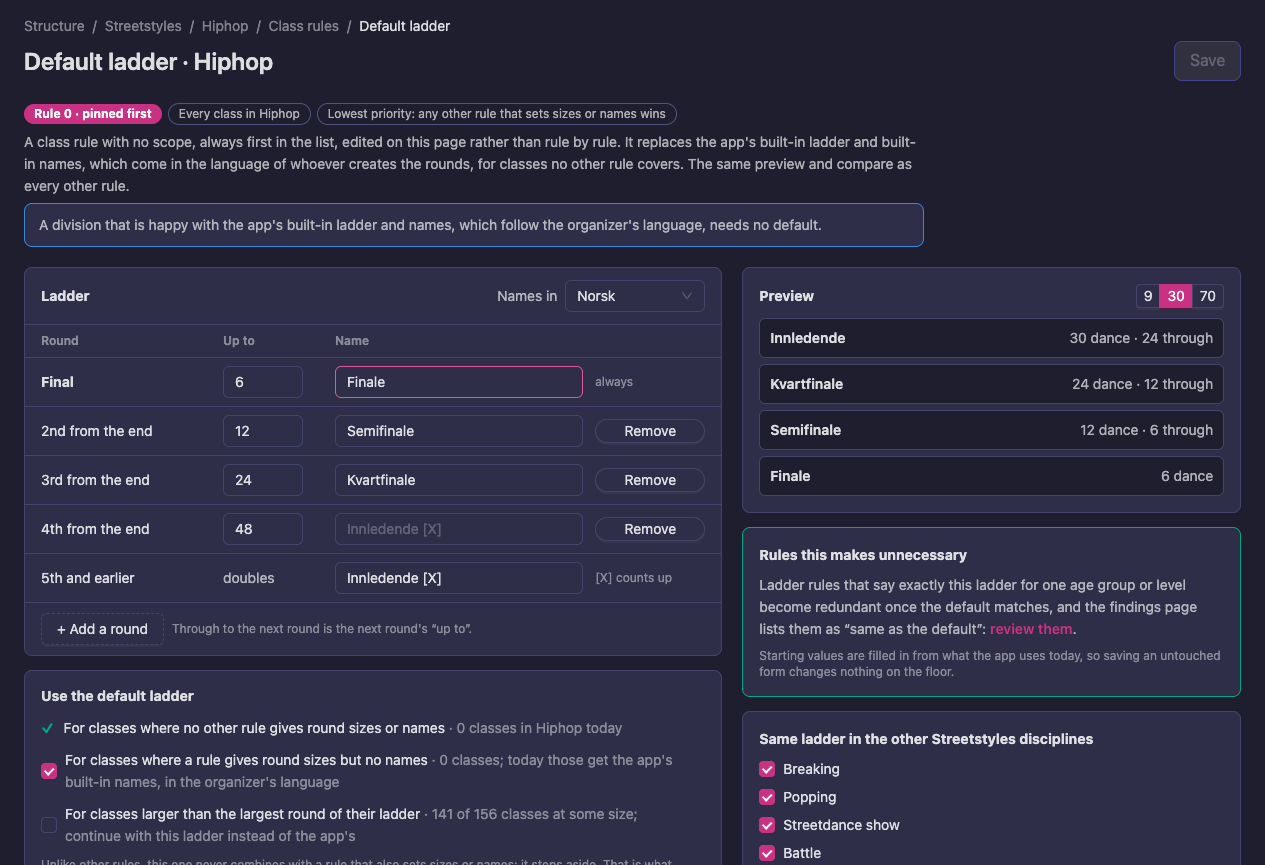
The three lines under Use the default ladder say which classes the default applies to, and how many classes in the discipline each one concerns today:
- For classes where no other rule gives round sizes or names — always on.
- For classes where a rule gives round sizes but no names — tick it so these classes get the default names instead of the app’s built-in names. On to begin with.
- For classes larger than the largest round of their ladder — tick it so that a class bigger than the ladder of its rules continues with this ladder instead of the app’s. Off to begin with.
The default never combines with a rule that also sets sizes or names; it steps aside. That is what makes it safe as a default. The starting values are filled in from what the app uses today, so saving an untouched form changes nothing on the floor; once you change something the page says how many classes get other rounds. Rules this makes unnecessary points to the Same as the default ladder findings: ladder rules that now say exactly the default.
Common mistakes
| Symptom | Likely cause | Fix |
|---|---|---|
| A rule hits the semifinal at one size and the final at another | When counts the round from the start | Use The semi-final, quarter-final or another round counted from the final |
| The quarterfinal settings land on the placing round in small classes | The 3rd round from the end is the first round when there is no quarterfinal | Check Rounds this hits at small sizes; limit the rule with And only when the class has between … competitors |
| Size 8 has no B-final while 9 and above do | The rule is limited to “9 or more” | Cover size 8 too, or drop the size limit |
| Two rules fight over the same round | A second rule was added for a round another rule already targets | Edit the existing rule instead; Also sets “…” for these classes shows who wins |
| Brackets and per-size rules give odd results | Both approaches are on the same class | Use one approach per class |
| A class gets the app’s own round names at some size | No rule gives the ladder there (a Ladder gap) | Open the Findings tab, or By class and look for Fallback |
| The Round Guide refuses to create rounds | The class already has competitors | Create the rounds before competitors are added |
| A dance list stops partway | A dance lists itself, directly or through another dance | The generator cuts off at the repeat; remove the loop |
Reference
Where class rules live
Class rules live per discipline under Federation → Structure → (division) → Discipline, in the Class rules tab. Applies to in the rule editor narrows a rule from the whole discipline to a category, class level or age group. Where a federation uses round setups, the rules a setup manages are listed under it and are read-only.
When: rounds and class sizes
All conditions on a rule must hold for it to fire. A rule with no conditions applies to every round.
| In the editor | Matches |
|---|---|
| Every round | All rounds |
| The final | The last round, whatever its number |
| Every round except the final | All rounds before the final |
| The first round | The first round of the class |
| The semi-final, quarter-final or another round counted from the final | The 2nd, 3rd or Nth round counting back from the final |
| A range of rounds | From round … to round …, counted from the start or from the final |
| And only when the class has between … and … competitors | A class size, both ends included; leave one end empty for “up to” or “or more” |
Actions
Set under Advanced in the rule editor.
| Action | Effect | Typical use |
|---|---|---|
| Modify (the default; with no round condition, the rule’s changes are the class defaults) | Changes the matching round. | Judging, a name or music on one round; the ladder on the base rule |
| Add After | Creates an extra round beside the matching round. | A B-final or bronze battle beside the semifinal |
| Remove | Removes the matching round from the list. | Drop a round the ladder would otherwise create for a given size |
Settings, by what they control
The shape of the class
| Setting | Values | Effect |
|---|---|---|
| Round sizes | A list of sizes, such as 2, 4, 8, 16, 200 | The ladder. The first size at least as large as the number of competitors is the first round; the ladder runs down to the final. In brackets mode, the largest size below 200 is the largest bracket (8 = up to quarterfinals, 16 = adds a round of 16). |
| Round type | Normal, Chance (Without placement), Points (Summary only), Match Race, Battle, Brackets | Brackets on the base rule builds a whole battle bracket for any size. Battle on one round splits it into one battle per pair (the older per-size setup). |
| Round name(s) | A list, or one name | On the base rule, a list read from the final outward, such as Final, Semi-Final, Quarter-Final, Preliminary [X]. On a rule that modifies or adds one round, the name of that round. |
Who advances and which places a round awards
| Setting | Values | Effect |
|---|---|---|
| Num to advance | Auto, a Count, or a Percent | How many advance. A count of 0 means nobody advances, as on a B-final. |
| Round position | A place, such as 3 | The first place the round awards. 3 on a B-final or bronze battle gives places 3–4. |
How the round is judged and danced
| Setting | Values | Effect |
|---|---|---|
| Judging type | A judging type of the federation, such as 10-0 or marks and placement | How the round is judged. The default comes from the federation’s judging configuration. |
| Hide from position | A place, and what to hide: Marks, Placements, Components, Coach/team leader only or Everything | Hides results from that place on until the competition is over. Use it on Every round except the final to keep marks hidden until the end. |
| Max on floor | A count | Most competitors on the floor at once; a larger round is split into heats. 3 on a semifinal gives trios (crosses). |
| Dances | List of dance names | Each dance becomes a sub-round. A dance can carry dances of its own, giving a third level (Battle sub-rounds). |
| Music length | A number of seconds (the guides use 240) | Music length for the round. |
| Extra time | A number (the guides use 40) | Extra time added to the round. |
The list under Change also has settings for brackets (Bracket: redance round and its name, judging type, comment and dances, Bracket: top 4 from the placing round at 6 and 7, Bracket: final of 3 at 3 competitors, Bracket: final with gold and bronze battle) and other round settings (Round comment, Round weight, Randomize heats, Number of alternates, Tempo, Acro). The battle guides use them.
Dance names in battles. In a battle round’s dance name, [X] becomes the battle number and [N] the number of battles — “Battle [X]/[N]” gives Battle 1/4 … 4/4.
Linked rounds. When the Round Guide creates a class’s rounds it also sets each round’s Round for those that qualify and Round for non-qualified participants, so Assign teams sends the competitors on without anyone choosing the rounds by hand:
- qualifiers go to the next round towards the final; the final sends nobody on;
- non-qualifiers go to a round added next to theirs (a B-final or a second chance), or else to the round’s own second-chance round (Extrachans);
- a second chance sends its qualifiers to the same next round.
You never set this in a rule, and the Manager can still change a link under Qualified participants. Battle classes in brackets mode, and classes whose rounds were created before this, have no links.
Point summaries. A rule that adds a point-summary round (Round type Points (Summary only)) always puts it after the final. When the rounds are created it goes last in the unscheduled block, totalling its own class.
Other rules in the same editor
These are set in the same rule editor but do not shape rounds. Each has its own guide.
| Rule | Guide |
|---|---|
| Age composition rules (application preset, younger/older allowances, maximum age span) | Age category rules |
| Promotion points source, points table, reach, awards promotion points, advance by, target class, promotion threshold | Promotion points |
| License items required for registration or progression | Federation admin licenses (section 4) |
| Ranking carry on age move up (%), Ranking carry on age move down (%): how much of a competitor’s ranking results follow an age move. Federation or division only. | Age moves |
How rules combine
- Rules are read in the order of the list, and when two rules set the same value for the same round, the later rule wins. Round names and round sizes are the exception: the app adds them up across every matching rule, and rules that overlap on them are reported as Overlapping ladders.
- The most specific layer that sets a value wins; layers that leave a value empty inherit it. See Federation Rules for the order.
- A structured value, such as the promotion points table, is replaced as a whole by a narrower layer — not merged row by row.
- Not every rule can be set at every layer. The Rulebook lists the layers each rule accepts, the value that applies, the layer that set it and the value it displaced.
Glossary
| Term | Meaning |
|---|---|
| Base rule | The rule with no round condition and no action; the class defaults. |
| Ladder | The Round sizes list — the capacities of the rounds, from the first round down to the final. |
| Default ladder | Row 0 of the list: the ladder for classes no other rule gives one. |
| Copy | One of several rules that do exactly the same thing for different classes. |
| Group | All the copies of one rule, shown as one row. |
| Finding | Something in the rules that probably is not meant, reported on the Findings tab. |
| Counted from the start / from the final | Two ways to number the same rounds: from the first round forward, or from the final backward. |
| Placing round | The first round, which ranks everyone before the bracket or later rounds. |
| B-final | An extra round beside the semifinal where the semifinal losers dance for 3rd and 4th place. |
| Crosses | Heats of three instead of pairs; Max on floor 3. |
| Round Guide | The Manager tool that builds a competition’s rounds from these rules. |
| Rulebook | The federation view that shows the value each rule ends up with, and which layer set it. |