Registering for an event
This page walks you through entering a competition on your own or with a partner, what your registration status means, and what to do when something blocks you.
In short: you register a competitor into a class. A competitor is you alone, you and a partner, or a group. Set up the competitor once, pick the class, pay if needed, and wait for Approved.
Not every event works the same way. Each organizer sets up their own event, and events under a federation also follow that federation’s rules. The steps below work everywhere. Things that only apply to some events are collected under Depends on your event. The event’s registration page always shows what applies to you: a class you cannot enter is shown as locked, with the reason. A federation can also put its own registration help at the top of the Registration tab, above the Vote4Dance guide.
Before you start
- Registration is open. The event’s Registration tab says when it opens and closes. In the Dancer app, the event’s Overview shows the same in a Registration card. Registering happens on the website: tap the card to open the event’s registration there.
- Your birth date is on your account. Classes often depend on age.
- You know which class you want to enter. If you are unsure, ask your club or the organizer.
Registering on your own (solo)
- Sign in on vote4dance.com, open the event and go to its Registration tab.
- Open the As myself tab. The first time, press Create competitor: your name is already filled in, so just press Save changes. Next time, pick yourself under Select competitor instead of creating a new one.
- Open the competition and press Add next to each class you want to enter. You can add several. They collect in the cart.
- Fill in the details the organizer asks for.
- Press Pay now to pay for everything in the cart at once, if the event takes payment. A class added by mistake can be removed from the cart with × before you pay. The cart stays on screen when you switch between As myself, With partner and As coach, and it is kept in the same browser for a day after your last change. Entries whose registration period has closed, or that are already registered, are dropped from it.
- Check your status.
Entering several things? Add them all before you pay, including a couple or duo class (see below). Where the event charges per dancer, a part that has already been paid is taken into account, so nobody pays twice.
Registering with a partner
A couple registers as one competitor with two dancers. You set up the couple once and reuse it for every event, so the first time takes a few extra minutes and later registrations are quick.
Step 1: Agree who registers
Only one of you needs to do it. The other dancer does not register separately. Both of you receive the confirmation and status emails.
Step 2: Create the couple
- On the event’s Registration tab, open With partner. When an event only has classes for couples, the page opens on this tab for you.
- If your couple is in the list, pick it and go to Step 3. Otherwise press Create competitors.
- Press Add a partner. Under Search for partner with email, type the email address of your partner’s Vote4Dance account and press Search. Your partner appears in the list.
- Your partner has no Vote4Dance account yet? When the search finds nobody, a Create account for partner section appears. Fill in their first and last name, country and language, and their birth date if you know it, and press Create account for partner. They are added to the couple straight away, so your partner does not need to sign up first. Use their real email address: it is where their emails go. They get a welcome email with a link to the sign-in page, and choose a password with Forgot your password? the first time they sign in.
- Choose the couple’s name: Use participant name (your two names) or, if it is offered, Assign custom name.
- Save the couple.
You may also see a Dance role field for each dancer (Leader, Follower or No role). You can leave it at No role. Only some events need roles; if a class does, it tells you, and you can add them then.
If you have danced together before, your couple may already exist, for example from imported results. Use it rather than creating a new one, so your results stay together. Your competitors are listed on your account page.
Step 3: Pick the class
Pick the couple under Select competitors, open the competition and press Add next to the class. If a class is locked or Add is disabled, read the reason next to it, and see If you cannot register.
Classes your competitor cannot enter are hidden to keep the list short. If the list says No classes fit this competitor right now, press Show more to see them. Each locked class says why. For example, This class needs a competitor with 2 people means you have picked a solo competitor for a couples class: open With partner and pick or create your couple.
Whoever registers the couple pays for both of you. If you are also entering classes on your own, add those to the same cart before you press Pay now.
Step 4: Fill in details, pay, and check the status
Fill in the requested details, pay if needed, and check your status. Tell your partner it is done: they get the emails too.
Changing a couple after registering
- Changing who is in the couple can create a new version of the competitor. You are warned before that happens.
- Some events do not allow changes after payment, or in some classes. Ask the organizer if you cannot edit.
- Once the organizer has imported the registrations into the competition, you can no longer edit it yourself. Ask the organizer.
What your status means
The status decides whether you are in. Only Approved counts.
| Status | What it means | What you do |
|---|---|---|
| Preliminary | Registered, but not yet a participant. Normal when the organizer approves by hand, you pay by invoice, or a functionary entered you. | Wait, or pay the invoice. Ask the organizer if it stays here close to the event. |
| Signed | An optional step the organizer uses for their own bookkeeping. | Nothing. |
| Approved | Accepted. You are in. Automatic when an online payment completes, or when the period accepts directly. | Keep the email: it has your check-in QR code. |
| Cancelled | Withdrawn by you, your club or the organizer. | Register again if it was a mistake and registration is still open. |
| Rejected | Declined by the organizer. | Ask the organizer why. |
You are emailed when the registration is created and whenever the organizer changes its status, as long as they have emails switched on. The Approved email carries your personal check-in QR code; you also have it in the app under Profile → Vote4Dance ID and on your account page. See Your Vote4Dance ID.
If you pay online and leave the checkout before paying, the registration is removed automatically. Nothing is left half-done; just start again.
Checking your registrations
Every event you are registered for has its own page, My registration. It lists every class you are entered in, what is paid and what you still have to do. You land on it when you finish registering, and you can open it from the event page, from the confirmation email, or from your account: open your name at the top right → My account, and press the event under Registration. See My registration.
Teams your club entered you in, such as a group or formation, are listed there too, with the names of everyone on the team.
In the Dancer app, the same registrations are under Profile → Registrations.
When the organizer handles entries
Some organizers take entries their own way, for example through a league or federation list, and add the dancers to Vote4Dance themselves. Those starts are not registrations in Vote4Dance, so they are not listed under your registrations, on the website or in the app. In the Dancer app, such an event’s Overview shows a Registration card that says Handled by the organizer. Look for yourself under the event’s Competitors tab once the organizer has added the dancers, and ask the organizer about anything to do with your entry.
Depends on your event
These only apply to some events. If one applies, the registration page or the organizer tells you.
| Only if… | What it means for you |
|---|---|
| …the event requires a licence | You, and your partner, need an Active licence from the event’s federation before you can enter. Pending and expired licences do not count. See Getting a license. |
| …a class requires dance roles | Set Leader and Follower on your couple. The locked class has a button that opens the couple’s roles. |
| …only certain people may register | Some events let only a member of the team, or only the club, register a competitor. If you are not allowed, ask your club to register you. |
| …the event asks which club you represent | Pick the club from your approved club memberships. |
| …a group or formation class only accepts club teams | Only a team owned by a club can enter. Ask your club to register the team. |
| …custom team names are not allowed | The custom name option is hidden, and your own names are used. |
| …the event uses classes you move up through | You can only enter the class you are in. Classes and age groups can change between seasons without you applying. See Class transfer and Age transfer. |
| …your club confirms its dancers on the day | If the organizer uses Organization check-in, teams their club has not confirmed are cancelled, even if you are in the hall. Make sure your club knows you are coming. |
If you cannot register
| What you see | What to do |
|---|---|
| Registration is closed, or not open yet | Check the dates on the event’s Registration tab. Late entries are up to the organizer. |
| The class list says No classes fit this competitor right now | Press Show more. The classes that do not fit are listed there, each with the reason it is locked. |
| A class says This class needs a competitor with 2 people | You picked a solo competitor for a couples class. Open With partner and pick your couple, or press Create competitors and add your partner. If your partner has no Vote4Dance account, you can create it there. |
| A class is locked | Read the reason next to the class. The table above explains the common ones. |
| A class says A dancer in this team is already in … or This team is already in … | Your federation allows only one class per category at an event: one age group and one level, for each dancer (solo, duo…) or each team (groups, formations). If you are in Solo Juniors 1 Rising Talent, you cannot also enter Solo Juniors 1 Ultimate Talent or Solo Children. Other categories, such as Duo or Clipdance, are not affected. To switch, remove the other class from your cart, or withdraw from it on My registration, and add the one you want. See One class per category. |
| A class you expected is missing | The organizer may not offer it in this registration period. Ask the organizer. |
| Your partner blocks the registration | Something is missing on your partner’s account, such as a birth date or a licence. They fix it on their own account. |
| You are not allowed to register this competitor | Ask your club to register you. |
| “This team does not belong to a club, and only club teams can enter this class.” | The class only takes teams owned by a club, and this team is independent even if its dancers are club members. A coach registers it under As coach: choose the club, create the team there and register that team. See Registering your club’s dancers. |
| A class says “Edit the lineup in the cart before registering”, or the cart refuses a team entry | The rules are checked on the lineup that dances, with skipped and replacement dancers applied. Use Edit lineup in the cart to skip or replace the dancer who does not fit, for example one who is too old. Your club usually does this. |
| None of the above | Ask the organizer. |
One class per category
Some federations, such as Danssport Vlaanderen, allow only one class per category at an event: one age group and one level. You choose which level to dance, for example Rising Talent or Ultimate Talent, but not both. For solos, duos and similar categories this applies to each dancer; for groups and formations it applies to each team.
Once one of these classes is in your cart or registered, the other classes of that category are greyed out and say which class you, or your team, are already in.
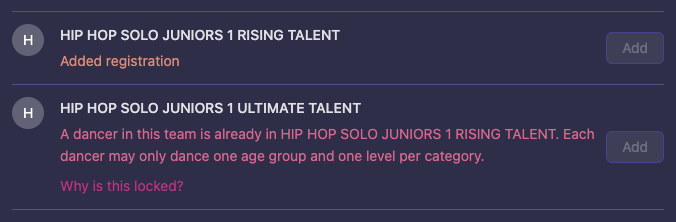
- Each category counts on its own. A dancer in Solo Juniors 1 Rising Talent can still dance Duo, Clipdance or Freestyle, in the class that fits.
- Groups and formations: each team may be in only one class of the category, but its dancers may also dance in your club’s other teams, in any class.
- To change your mind, remove the class from your cart, or withdraw from it on My registration, and then add the other.
Cancelling a registration
Withdraw from a class on the event’s My registration page: press Withdraw on the class and confirm. See Withdrawing from a class.
- The registration period you registered in must still be open. After it closes, ask the organizer.
- The registration must be Preliminary, Signed or Approved.
- A group or formation owned by a club can only be withdrawn by the club. Members see a note that the club manages the entry instead of a Withdraw button.
- Withdrawing a couple withdraws it for both of you.
The registration stays on the page as Cancelled. Nothing is refunded automatically: if you paid, contact the organizer, who refunds from the Manager app.
You can delete a competitor (such as an old couple) from your account only when it has no active registrations. Cancel those first.
Next step
Continue to Results, points and rankings to see how competing affects your rankings.