Your Vote4Dance ID
Your Vote4Dance ID is the QR code the entrance scans when you arrive at a competition. It is not a new number to remember — it is your own account, shown as a code. The same ID works at every event you go to, year after year.
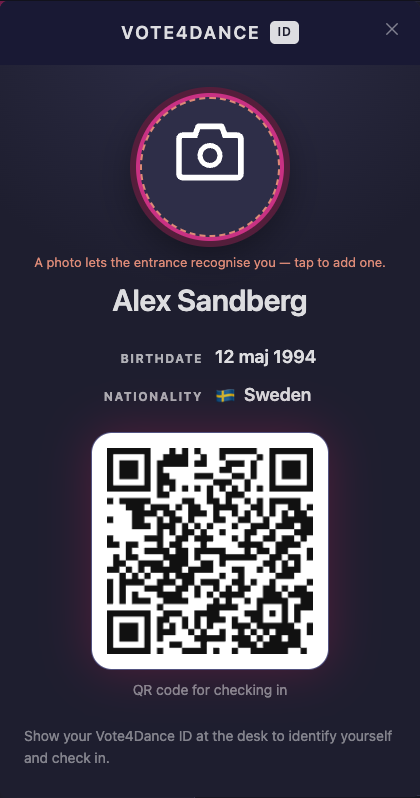
The card before a photo has been added — tap the circle to add one.
Where to find it
| Where | How |
|---|---|
| In the app | Profile tab → Vote4Dance ID |
| On the website | Log in → your account page → Vote4Dance ID |
| In your e-mail | The QR is also in the e-mail you get when a registration is approved |
The app is the practical one at a venue: two taps from the Profile tab, and your tickets are in the same place.
Add a photo
Tap the photo on the card to add or change one — from your camera roll or the camera itself. A clear picture of your face is all it needs.
The photo is what lets the desk recognise you when they scan your ID, and it makes the entrance quicker for everybody behind you. It is shown to event staff at an event you are registered for. It is not on your public dancer page.
What the desk sees
When you show your ID, the staff member sees your name and photo, your birth date and club, and:
- whether your registration admits you today, and which classes you dance
- whether your team leader has confirmed your club under Organization check-in
- the tickets on your own orders, if you bought any
They then mark you Arrived. That is all it does — it is a record that you showed up, not a check-in of your club.
Do I need a ticket?
Normally, no. Your registration is your admission — dancers do not buy a ticket to compete. Tickets are for the audience, for the people who come with you, and for extras like meals and merch.
Two exceptions, both chosen by the organizer for their own event:
- the event admits dancers only on the days they actually dance, and you want to come on the other days too
- the event asks every dancer to buy a ticket as well
Either way, the event’s Tickets page says so, and your own page tells you which days your registration covers.
Your tickets
If you bought tickets — for a parent, a friend, a dinner, a T-shirt — they are in the app under Profile → My tickets, and on the website under your account. Each one is its own QR code. Show it at the entrance, or let the person you bought it for show it: whoever holds the code can use it.
If your phone is flat
The desk can look you up by name or e-mail and open your screen without the QR. Bring an ID if your name is common — the photo on your Vote4Dance ID is what makes that easy, which is the other reason to add one.