Setting up registration for your event
Dancers and clubs register themselves on your event’s public page. Your job is to open a registration period, approve what comes in, and import the approved registrations as participants.
This page is the overview. Every screen is described in detail on Registration and check-in.
Where it is
Manager → Competition → Registration. The tab you set it up on is Registration period.
Registration is not the same as publishing the event. A published event can be seen, but nobody can register until a registration period is open.
Before you open registration
- Your classes are final, and each maps to the right Federation Class (for a federation event). See Competition setup.
- Prices are decided.
- If you take online payment, Stripe is connected to the competition. Connecting it needs the Manager role.
- Problems in Manager shows nothing you have not dealt with.
Step 1: Create a registration period
A period is one registration window. You can have several, for example an early and a late period at different prices. For each period, set:
| Setting | Choices |
|---|---|
| Name and dates | When it opens and closes. |
| Payment mode | Free, manual (invoice), or online with Stripe. |
| Acceptance mode | Manual: you approve each registration. Direct: registrations are approved automatically (with online payment, once paid). |
| Currency and prices | The price ladder. |
| Rules and form | What the registration asks for, and which rules apply. |
| Allowed classes | Which classes can be entered in this period. |
Step 2: Test it yourself
Register once as a dancer, the way your dancers will. Check:
- your class shows up and can be entered
- the price is right
- payment works, if you take it
- the registration appears on the Registrations tab with the status you expect
- the email arrives. See Emails and the check-in QR code.
Then cancel the test registration.
Step 3: Open it and tell people
Registration opens once the event is published and the period’s start date has passed. Tell dancers and clubs, and link to the guide for dancers: Registering for an event. It explains registering with a partner and what each status means.
Step 4: Approve registrations
On the Registrations tab:
| Status | What it means |
|---|---|
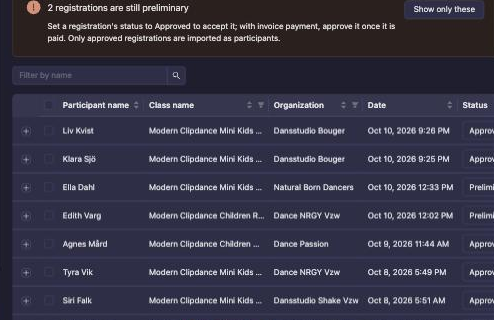
| Preliminary | Registered, not yet accepted. With manual acceptance or invoice payment, every registration starts here. |
| Signed | An optional step for your own bookkeeping. Never set automatically. |
| Approved | Accepted. Only Approved registrations become participants. |
| Rejected | Declined by you. |
| Cancelled | Withdrawn by the dancer, their club, or you. |
The list opens on Preliminary and Approved registrations together. A notice above it says how many are still preliminary; click Show only these to list just those, and set each one’s status to Approved to accept it. Change the status filter to see cancelled or rejected registrations.
Step 5: Import participants
When the period closes, press Update/import participants. It turns every Approved registration into a participant, and lists anything that changed or should be removed. Run it again after late approvals or cancellations.
Then assign start numbers and add participants to the first rounds. See From registrations to participants.
Common problems
| Problem | Fix |
|---|---|
| Nobody can register | Check that the event is published and that a registration period is open today. You need both. |
| A dancer cannot see or enter a class | Check the period’s allowed classes. Then check the class’s Federation Class: the dancer’s age, licence or dance role may not fit. The class list shows the dancer the reason. |
| A registration is stuck on Preliminary | With manual acceptance you approve it yourself. With invoice payment, approve it once paid. |
| An online payment was abandoned | The registration is removed automatically. The dancer starts again. |
| An approved registration is not in the lineup | Run Update/import participants again. The Imported check shows which registrations are in. |
| A dancer wants a refund after cancelling | Cancelling does not refund. You refund from Manager. If the dancer registered again and paid twice, see Paid twice after cancelling. |
Next step
Continue to Results, points and rankings if your event runs under a federation.